
Restaurant operations
Restaurant Menu Change Log: Approve Updates Before They Go Live
Use a lightweight restaurant menu change log to record approved price, dish, description and availability updates, publish them once, and verify the live result.
aiMenuu Editorial Team · October 8, 2026 · 8 min read
A restaurant menu change log is a short record of what should change, who approved it, when it becomes effective, where it must be published, and who verified the result. It prevents a price, dish name, availability note, or description from being edited in one place while an older version remains visible somewhere else.
Use one record for each approved release
A restaurant menu change log is a short record of what should change, who approved it, when it becomes effective, where it must be published, and who verified the result. It prevents a price, dish name, availability note, or description from being edited in one place while an older version remains visible somewhere else.
Treat a group of related edits as one release. Give it a date or simple identifier and list the exact items affected. An AI menu maker can turn an existing PDF or menu photographs into editable content and publish a mobile menu, but the restaurant still decides which information is correct and approved.
Keep the log deliberately small. A spreadsheet, shared document, or task record can work if the team knows which copy is authoritative. The value comes from clear ownership and a completed verification step, not from complicated software.
Describe the change at field level
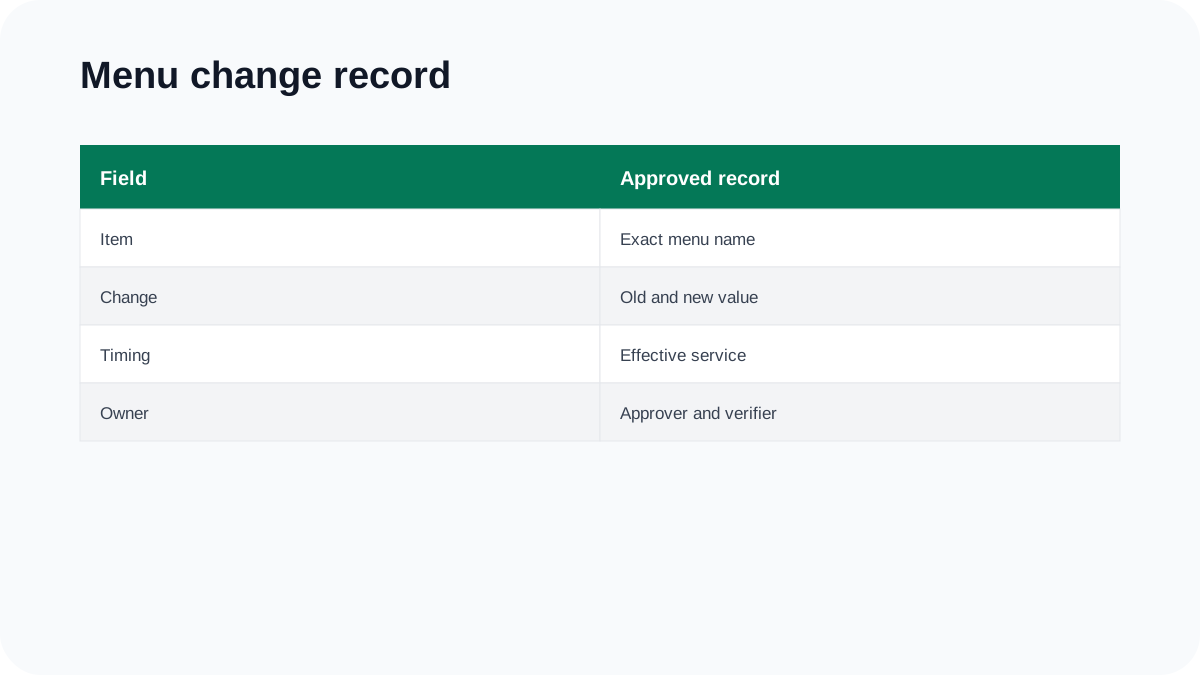
Write the current value and the approved replacement. “Update lunch menu” is too broad. “Change grilled vegetable plate price from the current approved amount to the new approved amount for lunch service” gives the editor a testable instruction without relying on memory.
Include the category, item name, description, price, size or option, availability state, photograph, and any guest-facing label that changes. If only one field changes, mark the others as unchanged. This prevents a well-intended editor from rewriting accurate content while making a small correction.
For a new dish, provide the complete approved entry. For a retired dish, identify every category or duplicate placement where it appears. Do not infer ingredients, allergens, preparation, or dietary claims from the item name.
Assign approval by information type
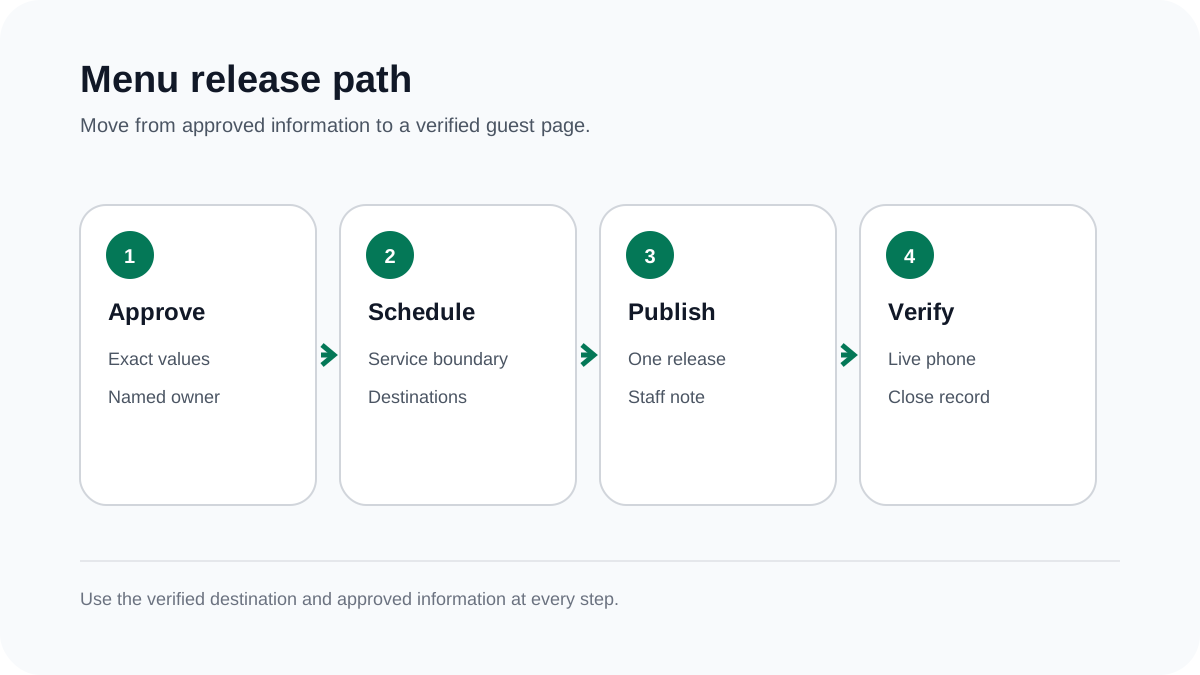
The person preparing the edit may not own every fact. The kitchen or product lead confirms what is served. The responsible business manager confirms price and effective timing. Guest-information wording should follow the restaurant's established food-information review.
Put the approver's name or role beside the relevant change. A message saying “looks good” is weak evidence if nobody can tell which version was reviewed. Attach or link the approved source and record the approval time.
Urgent availability changes need a shorter route, but they still need ownership. Define who may remove an unavailable item, who decides whether it returns, and how staff are told. An emergency path should be faster, not anonymous.
Set the effective service before publishing
Choose when the change becomes true for guests. A full date and a service boundary—such as the beginning of Friday dinner—are clearer than “tomorrow afternoon.” Account for existing bookings, printed material, and preparation already underway.
Do not publish a future price as if it applies now, and do not leave an old price visible after the new service begins. If different locations or service periods use different approved values, record them separately rather than forcing one ambiguous entry.
The related guide to seasonal menu changeovers explains how a broader release can align the kitchen, staff, QR destinations, and promotional material.
Edit from the approved source, not from chat fragments
Collect corrections in the change record before someone opens the menu editor. Prices sent in one message, descriptions in another, and photographs in a third are easy to combine incorrectly. The record should show which details belong to the same item and release.
When importing a revised PDF or menu photograph, treat extraction as a draft. Compare names, descriptions, digits, currency, options, and category order with the approved source. Keep owner corrections authoritative.
Use the restaurant menu proofreading guide for the final content pass. Proof the changed lines and their surrounding layout so a correct edit does not create a new wrapping or association problem.
Track every guest-facing destination
Add a destination checklist to the release: live mobile menu, website links, table QR destination, business profile, social bio, printed menu, and any approved external listing. Updating one menu does not automatically revise all the others.
Open the destination behind each link rather than checking only the label. A table QR can continue to work while opening an older attachment. A social post can remain public long after its temporary offer ends.
Assign each external update to a person and mark it complete only after verification. If a platform needs review time, record that status and prepare an accurate staff explanation until it becomes current.
Verify the live result on a phone
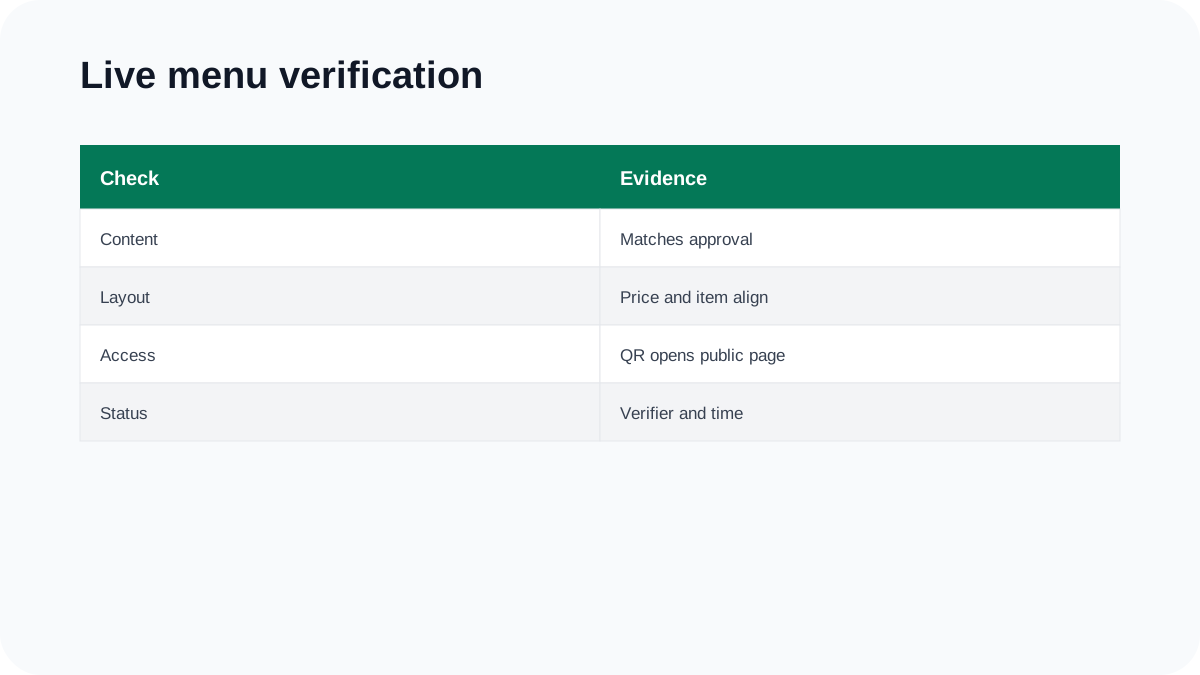
After publishing, open the public menu while signed out. Check every changed item, the price-to-item relationship, category placement, longest edited description, photograph, and availability state. Scan an actual table QR where one is used.
Compare the live page with the change record line by line. Mark verified only when the public result matches the approved value. If a cache or external platform still shows older information, keep the release open and record the exact observation.
The guide to displaying menu prices provides a focused check for alignment, option wording, currency, and mobile wrapping.
Tell staff what changed without sending the whole log
Prepare a short service note with the effective time, added or retired items, important price or description changes, and the person who can resolve a discrepancy. The full log remains the audit record; the shift note should be quick to use.
Ask a staff member who did not edit the menu to find the changed items on the public page. Their questions reveal labels, category placement, or descriptions that may be technically correct but difficult to understand.
If the restaurant keeps printed copies, identify which version is current and remove superseded copies from ordinary use. Do not assume that a new mobile release makes old paper disappear.
Keep corrections and experiments separate
A factual correction should not become an unplanned redesign. Fix the approved name, price, or description first. Review typography, colours, category structure, and photography as separate changes with their own purpose and approval.
Likewise, keep suggested descriptions or AI-generated improvements outside the approved release until a responsible person reviews them. A clearer sentence is not automatically factually correct for the dish.
The guide on how often to update a restaurant menu separates immediate corrections, monthly accuracy checks, quarterly reviews, and less frequent visual refreshes.
A change-log template you can copy
Use these fields: release ID, request date, effective service, category, item, field, current value, approved value, source, approver, editor, destinations, publication time, verifier, verification time, exception, and status.
Statuses can remain simple: requested, awaiting approval, approved, scheduled, published, verified, or rolled back. Do not mark a release complete merely because someone pressed Publish.
Review open entries after the first affected service. Resolve discrepancies, record the corrected result, and preserve the earlier value so the team can understand what happened. Over time, recurring errors will show where the workflow needs a clearer owner or source.
Frequently asked questions
What belongs in a restaurant menu change log?
Record the exact field changing, current and approved values, effective service, source, approver, editor, destinations, publication time and live verifier.
Who should approve menu price changes?
Use the restaurant's designated business owner or manager for pricing approval, while the kitchen or product owner confirms the dish information. Record the responsible person for the exact version.
Does publishing mean the change is complete?
No. Open the public menu, check the affected item and its surrounding layout, and verify every relevant destination before closing the release.
Should small corrections wait for a scheduled menu review?
Known inaccuracies should be corrected through the approved process as soon as practical. Scheduled reviews help find problems; they are not a reason to leave confirmed errors visible.